Apple Home doesn't give you a proper virtual switch you can use as a simple on/off flag. That becomes a problem when an automation trigger fires repeatedly (presence sensors and some motion setups are the usual culprits).
A clean workaround is to use a spare smart plug as a dummy switch — not to power anything, but to hold state. Then you can build "trigger once" behaviour:
First trigger: run your actions and flip the dummy switch ON
Next trigger(s): check the switch, see it's already ON, and exit
When you're done (or you leave the room): flip it OFF so it's ready again
I use this exact pattern in my Aqara FP2 post: "first time the desk zone activates it turns the dummy switch ON… if it triggers again and the switch is already ON, the automation exits."
WHAT YOU'LL GET
Best for: presence sensors, motion sensors, contact sensors, frequently-repeating triggers
What you'll achieve: automations that fire once and don't spam-repeat
Setup time: 10–15 minutes
Difficulty: Easy
BEFORE YOU START (SMALL BUT IMPORTANT)
A dummy smart plug is still a real mains device. If you toggle it, it cuts power to whatever is plugged into it.
To avoid surprises:
Plug it in with nothing connected (recommended).
Rename it aggressively so nobody uses it as a real plug.
Put it in a "System" room so it's not mixed in with normal accessories.
WHAT YOU'LL NEED
Any HomeKit or Matter smart plug that appears in Apple Home
A Home hub (HomePod / Apple TV) for automations
WHY THIS WORKS
Apple Home automations don't have a built-in "run only once" toggle. Presence sensors especially can update presence state multiple times while you're still in the same place.
So you create your own "already ran" flag using a smart plug:
OFF = not yet triggered
ON = already triggered (ignore repeats)
SETUP (THE DUMMY SWITCH)
Add a spare smart plug to Apple Home. For my example I've used one of my old trusted Meross smart plugs.
Move it into a room called: System / Automations / Utility.
Rename it something like:
DUMMY SWITCH – DESK TRIGGER
DUMMY SWITCH – OFFICE ONCE
Leave it powered, with nothing plugged into it.
THE LOGIC
You'll build two automations:
1. ENTRY / TRIGGER AUTOMATION
Trigger happens
If dummy switch is OFF → run actions, then set dummy switch ON
If dummy switch is ON → exit (do nothing)
2. RESET AUTOMATION
When you "finish" (leave room / presence inactive / after a timer)
Set dummy switch OFF so it's ready next time
EXAMPLE: AQARA FP2 DESK ZONE "TRIGGER ONCE"
I have an Aqara FP2 presence sensor set up in my office. When I enter the room it turns on the main light, and when I sit at my desk (Desk zone) the HomePod mini starts to play a radio station. Now if I were to move whilst in that Desk zone the whole automation would fire again, which would be deeply annoying. To get around this I have a Meross smart plug named SP1 in the office that I use as a Dummy Switch. When the Desk zone automation triggers it checks to see if this plug is on. If it isn't, it gets switched on as part of the automation. The next time the automation runs, triggered by movement at the desk, it checks the smart plug again. If it's already on, the automation does nothing and stops.
WHAT YOU'RE BUILDING
When Desk Zone becomes occupied:
run your actions once (music, plug, scene, whatever)
then set dummy switch ON
If Desk Zone triggers again while you're still there:
check dummy switch, see it's ON
exit so nothing repeats
AUTOMATION 1: DESK ZONE OCCUPIED (RUN ONCE)
Home → Automations → +
Choose the trigger that represents "desk zone active" (via Aqara/Home/Matter exposure as applicable)
Scroll down and tap CONVERT TO SHORTCUT
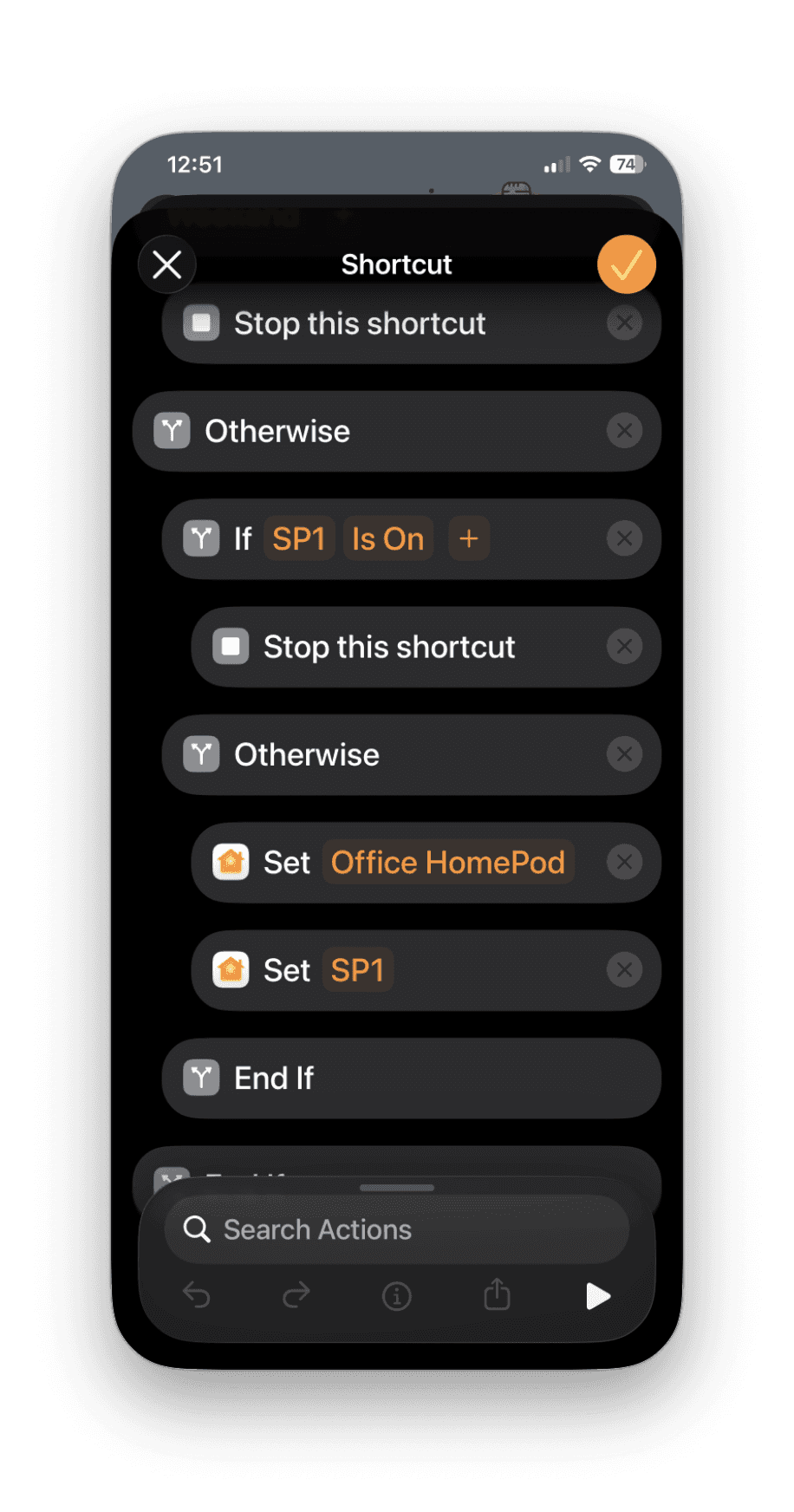
Your shortcut should look like this:
If Smart plug Is On
Stop this shortcut
Otherwise
Run your actions (examples):
Start playing radio on HomePod
Turn on a real smart plug (desk lamp / charger)
Set a scene ("Office On")
Set On
End If
ALTERNATIVE RESET METHODS (IF YOU DON'T HAVE A CLEAN "UNOCCUPIED" TRIGGER)
For my setup I have a Home scene that turns off the HomePod and the smart plug in the office and because the dummy switch is included in that scene, it gets reset at the same time. I trigger this scene using an IKEA smart button underneath my desk, so when I leave I just give it a tap. But you could trigger the reset another way:
OPTION A: HOME SCENE (TRIGGERED BY A SMART BUTTON OR SIRI)
Create a scene that includes turning the dummy switch off alongside your other "leaving" actions. You can then trigger it with a smart button, or just ask Siri: "Hey Siri, I'm outta here."
OPTION B: RESET AT A FIXED TIME
Example: reset your "Office Once" dummy switch at 17:30 daily.
WHERE ELSE THIS HELPS (REAL-WORLD USES)
1. PRESENCE SENSORS THAT CHATTER Stop repeated "occupied" events from replaying music or re-triggering scenes.
2. MOTION SENSORS IN BUSY AREAS Prevent repeated motion triggers from stacking actions (announcements, toggles, notifications).
3. "DO NOT DISTURB MY AUTOMATION" MANUAL OVERRIDE Flip a dummy switch ON to pause a specific automation cluster until you flip it OFF again.
TROUBLESHOOTING
I CAN'T FIND "GET STATE OF [ACCESSORY]" AFTER CONVERT TO SHORTCUT
In the shortcut editor, tap Add Action
Search for the plug name (e.g., "DESK TRIGGER")
Look for actions like "Get the state of…" / "Get Power State"
If it still doesn't show, confirm the plug is responding in Home, then try creating a fresh automation and converting it again.
IT STILL REPEATS
Confirm your logic sets the dummy switch ON inside the "allowed" branch (the first-run branch).
Confirm you have a reset path that reliably sets it OFF (presence inactive is ideal).
Add a notification temporarily ("Blocked due to dummy switch") so you can see which path is firing.
SOMEONE TURNED OFF THE WALL SOCKET / UNPLUGGED IT
Move it somewhere hidden or less accessible. The whole trick depends on the dummy plug staying powered and reachable.
SAFETY NOTE
Don't plug critical devices into a dummy switch. The whole point is state, not power control.
VERDICT
If you've ever had a "smart" automation that behaves like it's stuck in a loop, this is the fix. A smart plug dummy switch gives you a simple, readable way to build "trigger once" logic in Apple Home.
READ NEXT