In this seasonal post, I’ll show you how the Home application allows you to invite people into your HomeKit set-up so that they can control your home accessories. Additionally, if you truly trust your family and friends you can grant them extra permissions to add or remove accessories.
Prerequisites
An Apple Home set up already: You’ve created a Home in the Apple Home app and you can see your accessories inside it.
A Home hub is recommended (and may be required depending on what you expect guests to do): Apple TV or HomePod (or an iPad used as a hub, where supported) for reliable remote access and automations. If guests will only control accessories while on your Wi-Fi, this is less critical.
Guest requirements:
The guest has an Apple ID and is signed into iCloud on their iPhone/iPad.
The guest has the Home app installed (or is on iOS/iPadOS where it’s included).
Connectivity: Host and guest devices should have a working data connection; guests should ideally be on your home Wi-Fi for the best experience.
Optional (for “extra permissions”): Decide in advance whether you’re comfortable granting the ability to add/edit/remove accessories and manage automations (your post mentions this trust level).
Time to complete
5–10 minutes for one guest (allow a little longer if they need to check which Apple ID they’re signed into, or if they already have multiple Homes set up).
Invite people to control your home accessories.
Open the Home app
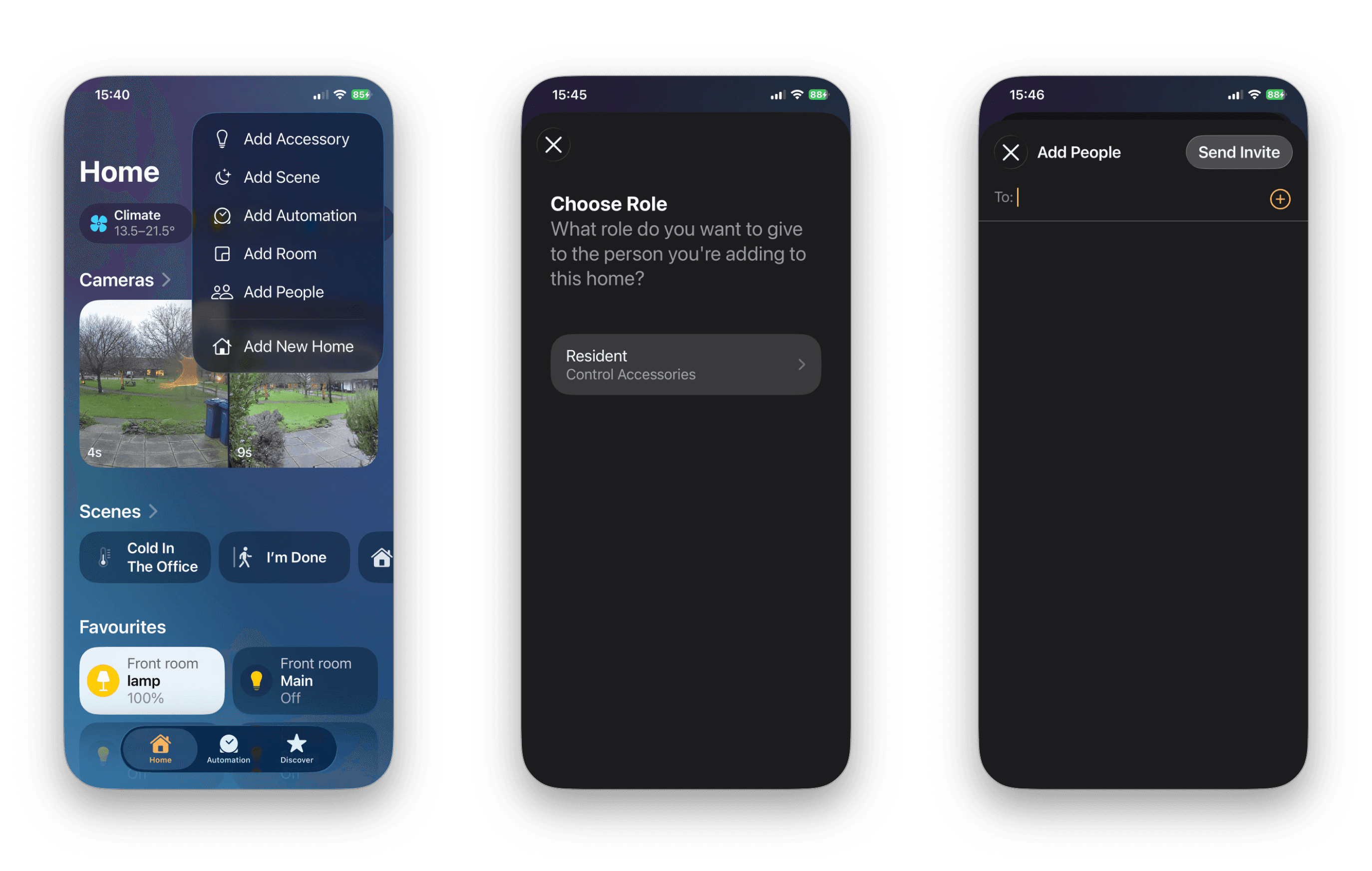
Select the Home symbol … (top right)
Select Home Settings.
Alternatively, select the + symbol next to the Home icon (iPhone) and select Add People
Tap Invite People…
Enter the person’s Apple ID that they use with iCloud. Select Send Invite.
The invited person will then receive the invitation with the Home app on their device which they simply Accept.
If the invited person already has a home set up of their own within their Home app they will need to select the correct home to control when opening the Home app.
Stop sharing.
When the festive period is over and we’ve all eaten and drunk way too much as we do every year, and your guests are finally leaving. It’s time to stop sharing your home setup.
Open the Home app.
Select the Home settings.
Under People select the invited and select Remove Person.
Wishing everyone a joyful and restful holiday season, filled with peace and happiness, no matter what you celebrate. Here’s to a wonderful New Year ahead!





More in
How to?
How To Add A Device To Apple Home (Homekit + Matter)
How to?
Fix “No Response” in Apple Home: 12 checks that solve it fast

How to?
Convert Home Automations to Shortcuts (and Make Automations Feel Smarter)

How to?
Restarting vs Resetting Your HomePod.

How to?
Updating firmware on AirPods

How to?
How to: Group HomeKit Accesories.

How to?
Backing up Shorcuts
How to?
Replacing a Apple AirTag battery.

How to?