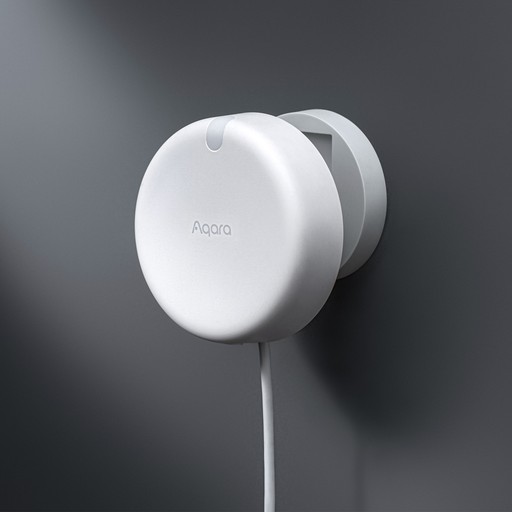
This isn’t a “first impressions” review. It’s the real version: what it’s like after months of daily use, what’s genuinely brilliant, what still annoys me, and whether I’d still buy it again today.
If you’ve ever had lights turning off while you’re sat still in a room, this post is for you.
WHAT YOU’LL GET:
Best for: Anyone who wants reliable presence detection (especially for offices, WFH setups, and motion-light automations)
What you’ll achieve: A clear idea of what the FP2 is like after a year of real use
Setup time: 10 minutes to read
Difficulty: Easy
WHAT THIS POST COVERS:
Where I installed it and why
What I use it for every day
What the FP2 does better than motion sensors
“Ghosting” (false presence) and how I deal with it
Whether zones are worth the effort
My best automation tip (dummy switch trick)
Would I buy it again?
— — — — —
BEFORE YOU START (SMALL BUT IMPORTANT):
The Aqara FP2 sensor is not a “set it in the corner and forget about it” device on day one.
It can become that — but only once you’ve spent a bit of time getting the placement and zones right. If you’re happy to do a few days of tweaking, it’s incredibly rewarding.
WHERE I’VE USED IT (MY SETUP)
The FP2 has lived in my office for the past year.
Mounted on an IKEA metal shelf unit
Just below head height
Pointing straight out into the room (no downward angle)
This placement has worked well for me and it’s been stable over the long term.
WHY I BOUGHT IT (THE PROBLEM I WANTED TO FIX)
I bought the FP2 mainly to:
Turn lights on and off based on presence
Make my office feel more hands-free
Improve reliability over motion sensors
Create zone-based automations
Stop lights turning off while I’m sat still at my desk
That last one is the big one.
A motion sensor is great when you’re walking around.
It’s not great when you’re working, watching something, or sitting still for long periods.
WHAT THE FP2 DOES THAT MOTION SENSORS DON’T
The FP2 is a presence sensor, not just a motion sensor.
In real life, that means it’s brilliant at answering:
“Is someone still in the room?”
A motion sensor often answers:
“Did someone move recently?”
That difference is exactly why the FP2 becomes so valuable in a home.
BEFORE WE GO FURTHER: FP2 VS STANDARD MOTION SENSORS
If you’re coming from a traditional motion sensor, the Aqara FP2 behaves very differently — and that difference is the whole point.
WHAT A STANDARD MOTION SENSOR DOES
Most HomeKit motion sensors are PIR (Passive Infrared) sensors. They work by detecting changes in heat moving across their field of view.
In practice, that means:
They trigger when you enter a space
They usually go inactive after a timeout (30 seconds, 1 minute, 2 minutes)
They’re great for quick actions like “turn on the light when I walk in”
They struggle to tell whether someone is still in the room
This is why you’ve probably seen automations like:
“Turn the lights off 5 minutes after no motion is detected”
It works, but it’s always a compromise.
WHAT THE AQARA FP2 DOES DIFFERENTLY
The Aqara FP2 isn’t a motion sensor in the traditional sense. It’s a presence sensor that uses millimetre-wave radar to detect whether someone is in a space — even if they’re sitting still.
Instead of asking:
“Did something just move?”
…it’s constantly answering:
“Is someone still here?”
That single difference changes how you can automate your home.
— — — — —
PRACTICAL EXAMPLES AFTER A YEAR OF USE
Lights that stay on while you’re actually in the room
With a PIR sensor, sitting on the sofa can easily look like “no motion”.
With the FP2, lights stay on because presence is still detected.
Automations that feel less like timers
I no longer rely on arbitrary delays (“wait 5 minutes, then turn off”).
Instead, automations can simply react to presence becoming inactive.
Zones instead of one big trigger
Because the FP2 supports zones, one sensor can replace multiple motion sensors:
sofa zone
desk zone
doorway zone
After living with it for a year, that’s been one of the biggest quality-of-life improvements.
A REAL-WORLD AUTOMATION I STILL USE DAILY: LIGHT LEVEL + PRESENCE
One of the automations that’s survived a full year unchanged uses the Aqara FP2 to control the main light in my office — and it’s a good example of where a presence sensor goes beyond what a standard motion sensor can comfortably do.
The goal is simple:
If I’m in the office and the natural light drops, turn the main light on.
If I’m still in the office and the light level improves, turn it back off.
No timers. No guessing. No “why did the light turn off while I’m still here?”
WHY THIS USES A SHORTCUT (NOT A BASIC HOME AUTOMATION)
Apple Home can react to light level changes, but once you want to combine:
Presence, a light sensor value, and conditional logic,
Shortcuts gives you much more control.
In this case, the Home automation triggers the Shortcut, and the Shortcut handles the decision-making.
THE LOGIC (IN PLAIN ENGLISH)
The Shortcut does three things, in order:
Check presence
If the FP2 reports that the office is occupied, continue.
If not, stop the Shortcut immediately.
Respond to light level
When the ambient light drops below my chosen threshold, the main office light turns on.
When the light level rises above that threshold again, the main light turns off.
Do nothing if I’m not there
This avoids lights switching on and off just because the room gets darker or brighter while it’s empty.
That “stop the shortcut if not occupied” step is the key. It’s what keeps the automation feeling intentional rather than jumpy.
WHY THIS WORKS BETTER WITH THE FP2
This automation relies on presence, not motion.
With a standard motion sensor:
sitting at a desk can easily look like “no motion” lights would eventually turn off you end up compensating with long delays or messy conditions
With the FP2:
The sensor continues to report occupancy while I’m working, the automation can safely react to light level changes and the light stays on as long as I’m actually in the room
After a year of use, this is the kind of automation that quietly proves the value of presence sensing. It doesn’t draw attention to itself — it just behaves the way you’d expect a room to behave.
WHY I LIKE THIS APPROACH
It adapts naturally to changing daylight.
It doesn’t rely on arbitrary timers.
It avoids unnecessary light usage.
It still works if I’m sitting completely still for long periods.
Most importantly, it feels room-aware, not rule-driven.
WHERE STANDARD MOTION SENSORS STILL MAKE SENSE
This isn’t a “replace everything with FP2” situation.
Traditional motion sensors are still better when:
You need something cheap and simple
You just want a fast “walk in → lights on”
Battery power matters
The room layout is very small or predictable
I still use standard motion sensors alongside the FP2 — they just solve different problems.
MY MOST IMPORTANT RESULT (1 YEAR LATER)
This is the biggest reason I’d recommend it:
Lights never turn off while I’m still — ever.
And I don’t mean “mostly solved it”.
I mean completely solved it.
Even during long calls, deep focus work, or when I’m sat at my desk without moving much, the lights stay on reliably.
That’s the core promise of a presence sensor, and it delivers.
THE BEST EVERYDAY BENEFITS
After a year, these are the four things I notice the most:
ENTERING THE ROOM ALWAYS FEELS INSTANT
Walking into the office and having the lights respond quickly feels normal now, but it still makes the room feel smarter than most setups.
IT FEELS HANDS-FREE
The office works without me opening Home, touching a switch, or thinking about it.
THE DESK AUTOMATION FEELS “MAGICAL”
This genuinely feels like the FP2 doing something special.
IT’S RELIABLE ENOUGH TO FORGET ABOUT
Most of the time, it just sits there doing the job. I’m not babysitting it.
ZONES AFTER A YEAR (WORTH IT, BUT FIDDLY)
Zones are one of the FP2’s headline features — and also one of the most fiddly parts to get right.
I do use zones, and I’m glad I stuck with them.
ZONE 1 (MAIN OFFICE ZONE)
If presence is detected, it turns on the main office light.
If no presence is detected, it turns the light off.
Simple, reliable, and easy to take for granted.
ZONE 2 (DESK ZONE – WEEKDAYS)
On weekdays, when the FP2 detects I’m at my desk:
a HomePod mini starts playing a radio station
a smart plug switches on
It feels oddly premium because it’s based on where I am in the room, not just “motion happened somewhere”.
ZONE SETUP REALITY CHECK
Zones aren’t instant to set up.
The tricky parts were:
Choosing the right mounting height and angle, aligning the room map properly, splitting zones cleanly, filtering out subtle movement (chairs, curtains, etc.)
It took a few days of tweaking — but once done, it stays done.
THE BIGGEST ANNOYANCE: GHOSTING (FALSE PRESENCE)
Ghosting is when the FP2 detects presence when nobody is there.
For me, it happens:
Randomly, a few times a month and the frequency hasn’t really changed over time. When it happens, the lights stay on, and I can see a phantom object in the Aqara room map.
It’s annoying — but manageable.
HOW I FIX GHOSTING
When ghosting appears, I reset the sensor using the AI learning feature in the Aqara app.
For me, this fixes it immediately.
MY BEST AUTOMATION TIP (THE DUMMY SWITCH TRICK)
To avoid repeat triggers, I use a smart plug as a dummy switch.
The first time the desk zone activates, it turns the dummy switch ON.
If the automation triggers again, it checks the switch state.
If the switch is already ON, the automation exits.
This gives “trigger once” behaviour, even if presence updates multiple times.
It turns a clever idea into something you can actually live with.
— — — — —
LONG-TERM RELIABILITY
Over the year, I haven’t had any major reliability issues.
No long flaky periods.
No constant reconnecting.
No weeks of random behaviour.
The main issues were ghosting and initial zone setup.
Once installed properly, it’s been very steady.
WHO I THINK THE FP2 IS PERFECT FOR
People who want:
Presence detection that doesn’t time out
Lights that stay on while you’re still
Zone-based automations
A genuinely hands-free feel
Especially good for:
Home offices
Liiving rooms
Kitchens
WHO IT’S NOT FOR
I wouldn’t recommend the FP2 if:
You don’t want to spend time tweaking
You need battery power
You want an instant, zero-tuning setup
You’re restricted by power options
SHOULD YOU BUY IT? (ONE-SENTENCE RULE)
Buy the FP2 if you want multi-zone presence detection and you’re happy to spend a few days getting it set up properly.
WOULD I BUY IT AGAIN?
Yes — without hesitation.
It solved my biggest problem completely and made my office feel effortless.
WHAT I’D CONSIDER NEXT
I’d still choose the FP2 for my office, but I’m considering the Aqara Presence Multi-Sensor FP300 for areas where constant power isn’t practical.
My ideal setup:
FP2 where power and zone control matter
Battery-powered presence sensors where placement flexibility matters
MAKE IT BETTER (OPTIONAL UPGRADES)
Use a dummy switch to prevent repeat triggers
Keep zones simple at first
Use AI learning to clear ghosting
Avoid aiming it at moving objects
Don’t rush the first few days — tweaking is normal
— — — — —
NEXT UP (READ THESE NEXT):
Fix “No Response” in Apple Home: 12 checks that solve it fast
Matter, Thread, Wi-Fi and Bluetooth: what actually matters in Apple Home
— — — — —
FINAL THOUGHTS
A year later, the Aqara FP2 has earned its place in my smart home.
It isn’t perfect, but the core promise of presence detection is delivered better than any motion sensor I’ve used.
If you want lights that turn on instantly and never switch off while you’re still (working at a desk, watching TV, or just not moving much), the Aqara FP2 delivers — and after a year I’d still buy it again.
Buy it if: you want proper presence detection and you’re happy to spend a few days getting placement and zones dialled in.
Skip it if: you want a simple, battery-powered sensor or you don’t want to tweak anything after setup.
For more information head over to the Aqara Site
FEEDBACK:
If this guide helped please let me know by completing the How useful did you find this? poll below.





More in
Reviews
IKEA timmerflotte review: The Best Budget Temperature and Humidity Sensor for Apple Home?
Reviews
IKEA MYGGSPRAY Review: A £7 Matter Motion Sensor
Reviews
IKEA BILRESA Dual Button Remote (Matter) - First Impressions in Apple Home

Reviews
Review: Eve Motion Sensor

Reviews
Review: Onvis SMS1 Motion Sensor
Reviews
Aqara G4 Doorbell
Reviews
HomePod Software Update 18.2

Reviews
Aqara Door and Window Sensor

Reviews